What Is Hiwonder MechDog?
Imagine a small robotic dog that can respond to visual information, react to its surroundings, perform movements, and execute programs that you create yourself. That is the idea behind the Hiwonder MechDog, a programmable quadruped robot designed for robotics education, embedded systems experimentation, and hands-on AI projects. Unlike a conventional remote-controlled toy, MechDog gives you an opportunity to explore how software, electronic hardware, sensors, and mechanical movement work together. You can start with basic walking commands and gradually experiment with more advanced features such as visual recognition, color tracking, and interactive behaviors. This makes it an interesting platform for students, hobbyists, electronics engineers, and makers who want to move beyond simple Arduino projects.
The official MechDog documentation includes programming lessons, motion-control examples, visual-recognition projects, and resources for developing custom behaviors. Depending on the hardware configuration and accessories available in your kit, you can explore features such as camera-based recognition and ultrasonic distance sensing. The platform also supports multiple programming approaches, helping beginners learn through visual blocks before moving toward text-based code. Rather than building every mechanical component and motor-control circuit from scratch, you can use the existing robot as a starting point for learning how a complete robotic system operates.
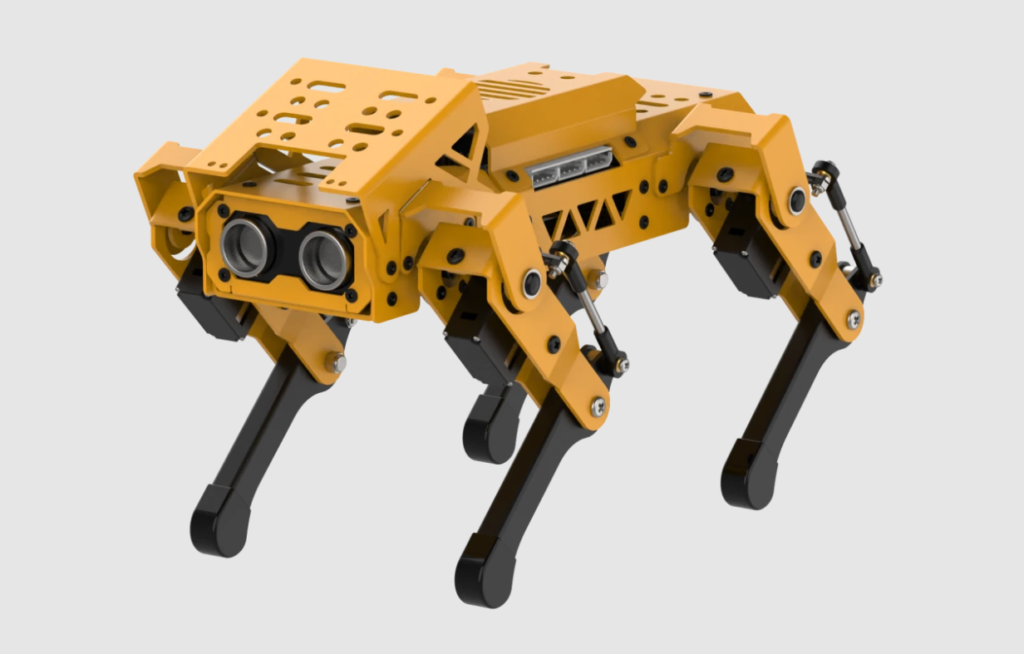
The Technology Behind This Miniature Robot
MechDog combines several engineering disciplines in one compact platform. Its control electronics execute programmed instructions, while servo motors adjust the positions of its legs to create different poses and walking movements. Additional modules can provide information about objects, colors, faces, or nearby obstacles, allowing the program to respond to the environment instead of following a fixed sequence of commands. This interaction between sensing, decision-making, and movement is one of the fundamental ideas behind autonomous robotics. A robot that detects a target, decides which direction to turn, and then moves toward it demonstrates a basic perception-to-action loop.
The platform’s programmable design makes it especially useful for understanding embedded systems. You can investigate how a controller communicates with peripheral modules, how software commands become physical movement, and how sensor readings influence a robot’s behavior. You can also modify example programs to change movement patterns, recognition responses, or the timing of particular actions. These experiments are valuable because robotics involves more than writing code: the mechanical structure, power supply, communication interfaces, sensor placement, and software logic must all work together. MechDog provides a practical way to explore these connections without requiring you to design an entire quadruped robot from the ground up.
Key Features of the MechDog Robot
The most interesting aspect of MechDog is the range of learning opportunities available through its programmable features. Instead of treating walking, visual recognition, and sensor interaction as separate demonstrations, you can combine them into a single project. For example, a robot could recognize a colored target, turn toward it, move closer while monitoring distance, and stop when an obstacle is detected. Such a project introduces several important concepts at once: conditional logic, sensor integration, movement control, and real-time responses. The exact features you can use depend on your MechDog version, connected modules, firmware, and the examples supported by your kit.
The official learning resources describe projects involving face detection, color recognition, color tracking, motion control, and other interactive behaviors. These projects are particularly useful because they provide a foundation that you can extend rather than forcing you to begin with an empty program. Once you understand the basic examples, you can change parameters, create new movement sequences, and combine multiple behaviors into more sophisticated applications.
Face Recognition and Color Tracking
Computer vision allows a robot to extract useful information from camera images. MechDog’s documented visual projects include face detection and color-based tracking through an ESP32-S3 vision module. In a face-detection demonstration, the robot can respond to a detected face by performing a programmed action, such as bowing. You could modify the example to trigger another supported movement sequence, making the robot appear to greet someone or acknowledge that a person is nearby. It is a simple but engaging introduction to event-driven programming: when a particular condition becomes true, the robot executes a chosen response.
Color tracking offers another approachable computer vision experiment. You could place a bright blue object in front of the robot and move it from side to side while the program attempts to follow it. The camera module identifies the target color, and the control logic uses the detection result to determine whether the robot should turn or move. This project introduces the relationship between image processing and physical navigation without requiring you to develop a complete object-detection model yourself.
You can extend the experiment by adjusting color thresholds, testing different lighting conditions, and comparing the results with different backgrounds. For example, a blue object may be easy to identify under consistent lighting but harder to distinguish when the background contains similar colors. Understanding these limitations teaches you an important engineering lesson: even a seemingly simple AI feature depends on the quality of its input data and the conditions in which it operates.
Voice Control and Obstacle Avoidance
Voice interaction can make a robot feel more accessible because you can trigger actions using spoken commands rather than writing every movement into a program. Depending on the supported hardware and software configuration, a MechDog project may let you associate commands with actions such as walking, turning, or changing posture. This provides an opportunity to learn how an input is interpreted, mapped to a command, and translated into a sequence of motor movements. However, voice interaction is not necessarily identical across every kit or firmware version, so you should consult the official documentation to determine which recognition features are supported by your particular setup.
Obstacle avoidance introduces another important robotics concept: a robot should account for its surroundings before moving. A compatible distance sensor can measure how close an object is, allowing a program to stop the robot, turn away, or choose another action when the measured distance crosses a threshold. Imagine programming MechDog to walk forward until it approaches a wall, pause, rotate, and continue in a different direction. This simple behavior demonstrates how sensing and conditional logic can make a mobile robot more responsive.
It is important to distinguish basic obstacle avoidance from advanced autonomous navigation. A robot that reacts to a distance threshold does not automatically understand its environment, build a map, or plan an optimal route. Those capabilities require additional algorithms, sensing, and system integration. Nevertheless, combining visual recognition with distance measurements gives you a useful foundation for exploring more advanced autonomous robots.
Hardware and Embedded Systems
A robot’s intelligence depends on more than its software. Underneath every programmed behavior is a physical system that must supply power, read sensors, communicate with modules, and generate controlled movement. MechDog provides a compact way to investigate these relationships because the electronics and mechanical components are already integrated into a working quadruped platform. Instead of spending all your time designing motor drivers and assembling a chassis, you can focus on understanding the complete system and experimenting with its behavior.
For electronics enthusiasts, this creates opportunities to study digital interfaces, controller firmware, servo actuation, sensor integration, and power management. You can also explore how the program behaves when sensor readings change or when a movement command is adjusted. These practical experiments help bridge the gap between theoretical electronics knowledge and real-world embedded engineering. They are particularly relevant for students and makers who want to understand how a microcontroller-based product combines hardware and software into one functional device.
ESP32, Servos, and Expandable Sensors
The ESP32 family of microcontrollers is widely used in embedded electronics because supported variants offer combinations of processing capability, wireless connectivity, and peripheral interfaces. In MechDog’s documented vision projects, an ESP32-S3 vision module provides camera-based recognition capabilities and communicates with the robot through a supported interface. The main robot controller and the vision module have distinct roles, so it is useful to follow the wiring instructions and firmware requirements for the specific configuration you own.
Servo motors make the robot’s movement possible by positioning its legs according to the commanded motion. Coordinating multiple servos is more complicated than controlling a single motor because the robot must maintain suitable posture and timing while moving its body. Walking, turning, and changing stance require coordinated adjustments across several joints. Experimenting with motion parameters helps demonstrate why robotic locomotion involves both mechanical design and software control.
Expandable interfaces add another layer of learning. Compatible sensor modules can provide distance measurements or other information, while supported expansion accessories may allow you to explore new interactions. MechDog’s official documentation includes sensor integration and additional project resources, but compatibility should always be checked before connecting third-party hardware.
Power management also deserves attention. Servos can draw substantial current during movement, especially when several joints move simultaneously or experience mechanical resistance. A weak or unsuitable power supply can cause resets, unstable behavior, or unreliable sensor readings. Always follow the manufacturer’s battery and charging instructions, avoid forcing the robot’s joints, and disconnect power before changing wiring. These practical precautions are part of learning to build reliable embedded systems.
Programming the MechDog
One reason MechDog is interesting for makers is that programming can begin with simple actions and develop into more complex behaviors. You do not need to start by implementing advanced AI algorithms or writing a complete motor-control system. Instead, you can run a supplied example, observe what the robot does, change one part of the program, and test the result. This experimental approach helps you understand cause and effect, which is essential when working with physical systems.
The official documentation provides programming resources for Scratch, Python, and Arduino-based projects. These options support different experience levels and offer different ways to interact with the hardware. The best approach is to select the environment that matches your current skills, then progress toward more advanced development as your confidence grows.
Arduino, Python, and Scratch
Scratch is a useful starting point for beginners because it uses visual programming blocks instead of requiring every instruction to be typed as text. You can learn how sequences, conditions, loops, and events control a robot’s behavior. For example, a simple program might command MechDog to move forward, pause, turn, and return to its starting position. Visual blocks make it easier to see the structure of the program, allowing you to concentrate on the logic before worrying about programming syntax.
Python is a natural next step for learners who want to explore more flexible programming techniques. With the appropriate MechDog libraries and supported editor, you can write conditions, manage sensor readings, and combine multiple behaviors in a text-based program. Python is widely used in automation, data processing, and AI development, making it a valuable language for anyone interested in robotics. MechDog’s documented Python projects include color recognition, color tracking, and face-detection demonstrations.
Arduino programming provides another route for users who prefer working closer to the microcontroller and its hardware interfaces. The documented examples show how to initialize the robot, communicate with the vision module, retrieve recognition results, and execute movement actions. You can use these examples to learn about embedded C/C++, library functions, firmware uploads, and the relationship between a controller and its connected peripherals.
These environments serve different purposes rather than competing with one another. Scratch helps introduce programming logic, Python supports readable high-level experimentation, and Arduino-style development provides a familiar path toward embedded firmware work. Your best choice depends on the project you want to build and the development tools supported by your particular MechDog kit.
Getting Started With the Official Project Guide
If you want to start experimenting, begin with the manufacturer’s setup instructions rather than immediately changing the firmware. The guide explains the preparation process and provides links to the project’s learning resources. Reading the instructions first can help you identify the required components, understand the connection process, and avoid configuration errors that may otherwise be confusing for a beginner.

Step 1: Prepare your robot
Check the contents of your kit, charge the battery as instructed, inspect the servo connections, and identify the controller and any optional vision or distance-sensing modules. Use the official guide to confirm which features your version supports.

Step 2: Connect the development environment
Install the appropriate software and drivers, connect the robot using the recommended data cable, and select the correct board or connection settings. Use the documentation for your programming environment rather than assuming every board variant uses identical settings.

Step 3: Run a basic example
Start with a documented movement or recognition example. Verify that the robot responds as expected before modifying the code. If a vision project requires separate camera firmware, follow those flashing instructions as well.

Step 4: Modify and test
Change one parameter at a time, record the result, and investigate unexpected behavior. Once a simple program works reliably, combine it with another supported feature to create your own robotic experiment.
Use the official MechDog getting-started guide and the Hiwonder MechDog GitHub repository as your primary starting points. The official programming documentation is also useful when you need environment-specific examples, setup instructions, or additional project ideas.
AI Robotics Projects You Can Build
The real excitement begins when you stop running examples and start designing your own robotic behaviors. MechDog can serve as a small experimental platform for combining sensing, control logic, and movement into interactive projects. You do not need to build an advanced humanoid robot or autonomous vehicle to learn meaningful robotics concepts. Even a simple project that follows a colored object or reacts to an obstacle can teach you how a robot gathers information and uses it to make decisions.
Here are five project ideas worth exploring:
| Project idea | What you can learn |
|---|---|
| AI greeting robot | Face detection, conditional logic, and motion sequences |
| Color-following robot dog | Computer vision, target tracking, and movement control |
| Obstacle-aware robot | Distance sensing, decision-making, and navigation basics |
| Voice-controlled companion | Command recognition and event-driven programming |
| Custom robotic assistant | Sensor integration, embedded programming, and behavior design |
For an AI greeting robot, you could modify the documented face-detection example so that the robot performs a greeting motion when it detects a face. A more advanced project could combine face detection with a timed response, preventing the robot from repeating the same action continuously while a person remains in view. This teaches you to think about event handling, delays, and program state rather than simply connecting a sensor to an action.
A color-following project can be extended by adding distance-based stopping logic. For example, the robot could follow a colored target while it remains within a suitable operating range, then stop if an obstacle becomes too close. This project introduces the idea of combining multiple sensor inputs into a single decision-making process. If you enjoy embedded systems, you could also investigate how frequently the program reads sensor information and how that affects the robot’s responsiveness.
You can explore more ambitious ideas as your skills improve. Try designing a repeatable patrol routine, developing a sequence of expressive movements, or building a simple interface that lets you select between predefined behaviors. For every project, start with a clear objective, test each feature independently, and combine them only after the individual components work reliably. This method makes troubleshooting easier and helps you build a deeper understanding of robotics engineering.
Educational Benefits for STEM Students
MechDog can be useful in science, technology, engineering, and mathematics education because it turns abstract concepts into visible results. A student can write a movement command, observe the robot’s response, and adjust the program when the result differs from expectations. This creates a practical feedback loop that encourages experimentation. Rather than learning about sensors or control systems exclusively through diagrams, students can investigate how these components behave in a physical machine.
For programming beginners, the platform offers opportunities to practice loops, variables, functions, conditional statements, and event-based logic. Students can gradually progress from visual programming to Python or Arduino-based development as they become comfortable with the fundamentals. Because the robot responds physically to instructions, programming mistakes are often easier to notice and discuss. A wrong turning direction or an unexpected stop becomes an opportunity to investigate the logic behind the behavior.
Electronics learners can use the platform to explore communication interfaces, power requirements, sensor integration, and embedded controllers. Mechanical engineering students can investigate leg movement, joint coordination, stability, and gait patterns. More advanced learners can explore computer vision, system integration, and simple autonomous behaviors. These activities also encourage interdisciplinary collaboration: one student might work on the vision module, another on movement control, and another on the overall program.
For teachers and robotics clubs, a programmable quadruped can provide a common platform for projects of different difficulty levels. Beginners might focus on basic movement, while experienced students build more sophisticated sensor-driven behaviors. The key is to match the project to the learner’s current abilities and make sure every participant understands the system rather than simply copying code that happens to work.
Customization, Limitations, and Safety
One of the most appealing aspects of MechDog is the opportunity to customize its behavior. You can change movement sequences, experiment with sensor thresholds, and develop programs that combine several functions. The manufacturer’s documentation also describes additional learning resources, including sensor integration and expansion projects. However, the possibilities depend on the hardware version, available accessories, supported software, and the interfaces exposed by the installed firmware.
It is also important to understand what the robot does not automatically provide. Face detection does not necessarily mean identifying a particular person, and color tracking is not the same as recognizing arbitrary objects. Basic obstacle avoidance does not imply full autonomous navigation. Likewise, support for a programming language does not mean that every third-party library or AI framework will run directly on the robot. Some tasks may require an additional computer, a compatible module, different firmware, or a separate software workflow.
Before purchasing a kit, verify the exact model and included accessories. Check whether the vision module, distance sensor, battery, and other components required for your intended projects are included or sold separately. Review the documentation to establish which programming tools are supported and whether the project requires special firmware. This helps prevent the common frustration of buying a robotics platform for a feature that requires an additional module.
Safety matters, too. Keep fingers, loose cables, and other objects away from moving joints, and operate the robot on a stable surface with enough room to move. Use only the recommended battery and charging method, and disconnect power before modifying the wiring. Test new movement sequences at low speed where possible, and supervise children during assembly and operation. If you are experimenting with obstacle avoidance, do not assume the robot will detect every object or stop reliably in every situation.
MechDog vs. Traditional DIY Robot Dogs
Should you purchase an integrated robotics platform or build a robot dog entirely from scratch? The right answer depends on what you want to learn. MechDog offers a starting point with an existing mechanical structure and documented programming examples, while a completely custom robot gives you greater control over the hardware design.
| Comparison | Hiwonder MechDog | Build-it-yourself robot dog |
|---|---|---|
| Initial setup | Uses an existing robot platform | Requires component selection and assembly |
| Mechanical design | Based on the supplied structure | Fully customizable |
| Motor control | Uses supported hardware and software | Requires your own control implementation |
| AI experiments | Can use compatible documented vision features | Depends on your chosen camera and computing hardware |
| Programming | Offers documented learning paths | Depends on the controller and software you select |
| Expansion | Limited by compatibility and available interfaces | Potentially broad, but requires integration work |
| Learning emphasis | Programming, integration, and robotics experiments | Hardware design, assembly, and system development |
An integrated platform is often a practical choice if your primary goal is to learn programming, computer vision, and robotic behavior without first solving every mechanical engineering problem. It lets you spend more time experimenting with software and less time troubleshooting a custom chassis.
Building a robot dog from scratch may be more rewarding if you specifically want to design the frame, select actuators, calculate torque requirements, develop motor-control electronics, and implement locomotion algorithms. You will have greater flexibility, but you must also account for the additional development time and the challenges of making multiple mechanical and electronic components work together.
Neither approach is universally better. You can even use MechDog as a stepping stone: learn the fundamentals on the supplied platform, then apply those lessons when designing a custom quadruped with your own controller, sensors, and mechanical components.
Conclusion
The Hiwonder MechDog is an interesting entry point into the world of AI robotics, ESP32 projects, embedded systems, and programmable robot dogs. Its combination of quadruped movement, supported visual-recognition projects, and multiple programming approaches gives makers a practical way to explore how software interacts with physical hardware.
Whether you are a beginner learning Scratch, an Arduino enthusiast experimenting with sensor integration, or a Python programmer interested in computer vision, the platform offers several ways to start building. You can begin with a basic movement sequence, progress to color tracking or face-detection responses, and gradually combine features into more sophisticated robotic behaviors.
The most important part is not simply watching a robot perform a trick. It is understanding the engineering behind that action and learning how to create your own. With a clear project goal, careful testing, and the right documentation, MechDog can become a useful learning tool for anyone curious about robotics.
Explore the resources here:
- Project guide: Hiwonder MechDog Getting Started
- Source code: Hiwonder MechDog on GitHub
- Programming tutorials: Official MechDog Documentation
Would you build your own AI-powered robot dog? Share your ideas in the comments, and follow for more open-source robotics projects, Arduino tutorials, ESP32 experiments, AI gadgets, and emerging technology.
Frequently Asked Questions
1. What is the Hiwonder MechDog robot?
Hiwonder MechDog is a programmable quadruped robot designed for robotics learning and experimentation. It provides a platform for exploring movement control, embedded programming, and supported sensor and vision projects. The exact capabilities depend on the model and installed accessories.
2. Can MechDog recognize faces and track colors?
The official documentation includes face-detection and color-tracking projects using a compatible ESP32-S3 vision module. Face detection can trigger a programmed movement, while color tracking can help the robot respond to a moving target. Check your kit’s hardware and firmware requirements before attempting these projects.
3. Which programming languages does MechDog support?
The official learning materials include Scratch, Python, and Arduino-based programming projects. Scratch is useful for learning programming logic visually, Python offers a text-based development path, and Arduino programming helps you explore embedded control. The available features and setup procedures vary by environment.
4. Is MechDog suitable for beginners?
Yes, it can be a useful learning platform for beginners who want to explore robotics through practical experiments. Starting with basic movement and visual programming can make the learning process more manageable. Beginners should follow the setup instructions carefully and progress to advanced features only after understanding the basic controls.
5. Where can I find the MechDog source code and tutorials?
You can begin with the official GitHub repository and the MechDog getting-started guide. The official documentation contains additional programming lessons and project examples. Review the requirements for each project to determine which hardware and firmware you need.